eAU Sick Notes
In Germany, when an employee is off sick, the employer retrieves the incapacity certificate (elektronische Arbeitsunfähigkeitsbescheinigung, eAU) electronically from the employee's health insurer rather than receiving a paper note. flair can send that request for you and record the insurer's answer against the absence, so the certificate's details sit exactly where you manage the sick leave.
This article walks you through configuring eAU on your payroll integration, requesting and withdrawing certificates on an absence, and reading what the insurer sends back.
Setting Up eAU
eAU is configured on the payroll integration in Salesforce. Turn on the Enable eAU switch at the top of the integration record, and the eAU tab appears.
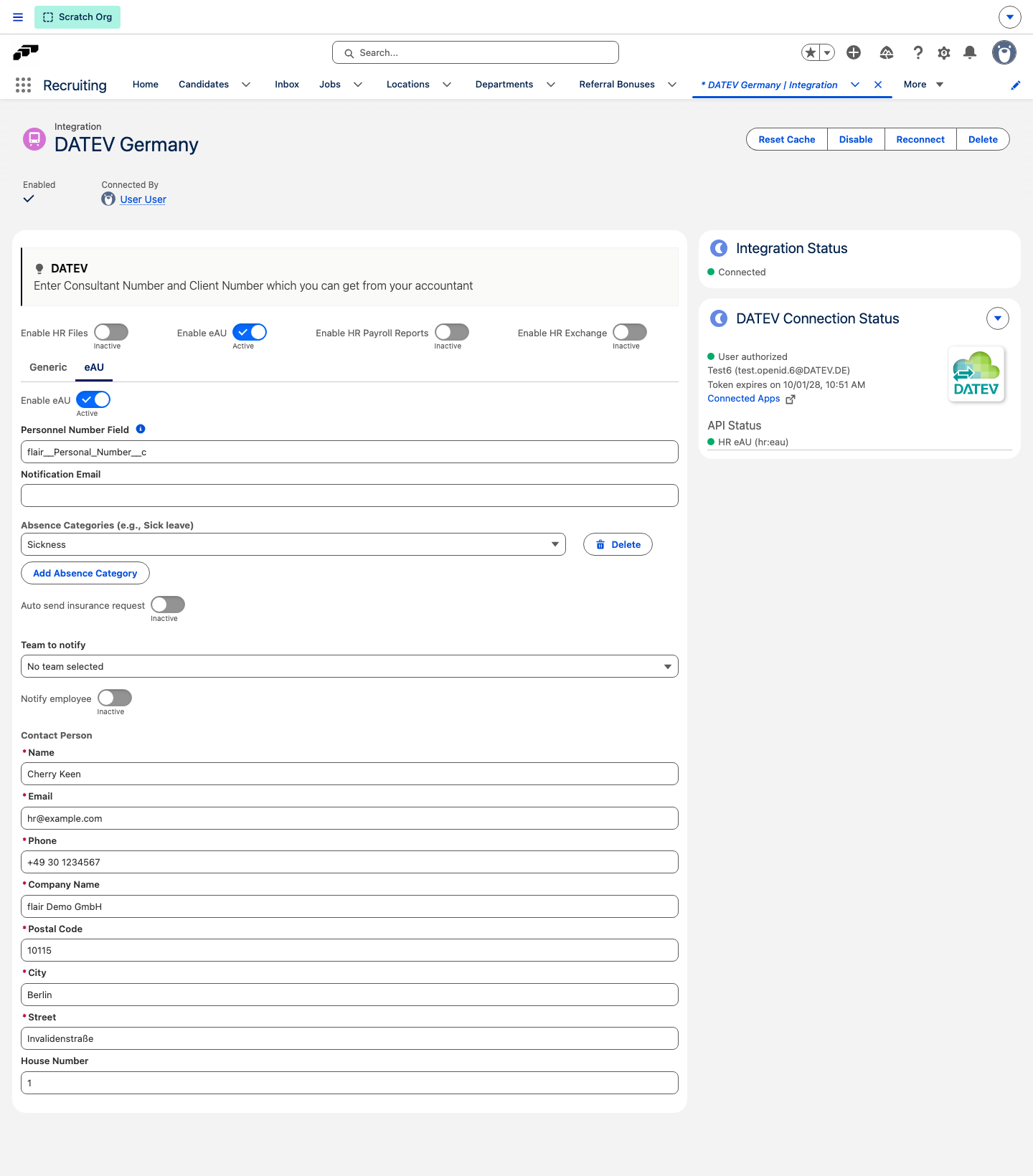
The settings on this tab are:
- Enable eAU — turns the feature on.
- Personnel Number Field — the employee field that holds the personnel number sent with the request.
- Notification Email — an address that receives eAU notifications.
- Absence Categories — the absence categories, such as sick leave, that eAU applies to. Click Add Absence Category to add one.
- Auto send insurance request and Auto send insurance request delay (minutes) — send the request automatically once an absence is recorded, optionally after a delay.
- Team to notify and Notify employee — who hears about the outcome.
- Contact Person: Name, Email, Phone, Company Name, Postal Code, City, Street, and House Number — the employer contact details sent with the request. All except House Number are required.
Turn Enable eAU on, add the absence categories, fill in the employer contact details, choose who should hear about the outcome, and click Save. If requests should go out on their own, enable Auto send insurance request and set a delay in minutes if you need one.
When Configuration Is Incomplete
flair blocks the request and tells you what is missing when configuration is incomplete. The messages you may see are:
- "EAU config is missing"
- "Absence categories are missing"
- "Contact person is missing"
- "Payroll territory ID is missing"
- "Personnel number field is missing"
- "Target system is missing"
- "No employee number"
- "No team selected"
- "Connection revoked. Reconnect your integration."
Each message names what flair is missing, so correct the data it names and request the certificate again.
Requesting a Certificate on an Absence
The absence record carries an eAU Status card. It shows the DATEV integration used for the request, whether its HR eAU (hr:eau) connection is working, and the requests sent so far, or No eAU requests.
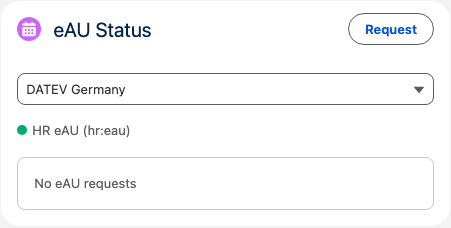
From there you can:
- Request the certificate from the employee's health insurer.
- Withdraw a request you no longer need.
flair confirms the outcome with eAU Request Success or eAU Withdraw Success. If something goes wrong, it reports eAU Request Error or eAU Withdraw Error with the message Please try again later.
Each request on the card shows:
- Status
- Checked at — when flair last checked with the insurer
- Automatic Feedback Until
What the Insurer Sends Back
The answer can include:
- Start Work Incapacity (AU) and End Work Incapacity (AU) dates
- Start Hospitalisation and End Hospitalisation
- Date of Diagnosis
- Whether the case is an Initial Certificate, a Current Work Incapacity, an Accident at Work, an Other Accident, or an Assignment Accident Insurance Doctor case
It also records the employer's own Start Work Incapacity (Employer) date, so the insurer's period and the employer's can be compared side by side.
Insurer Responses
Insurers can return one of these outcomes, which flair shows in plain words:
| Response | Meaning |
|---|---|
| Incapacity for work | The certificate exists and the employee is signed off. |
| Hospitalisation / Inpatient hospital treatment | The absence is due to a hospital stay. |
| Health insurance not responsible | This insurer does not cover the employee. |
| eAU or hospitalisation - report is not existing | No certificate has been filed. |
| Rehabilitation prevention | The absence relates to a rehabilitation measure. |
| In verification | The insurer is still checking. |
| Other evidence available | Other proof exists in place of an eAU. |
| Forwarding procedure | The request has been passed on. |
| Other | Anything else the insurer reports. |
Cancellations and Errors
A request can also come back as Cancelled or as a Cancellation. Problems appear under Feedback errors and Additional Messages, with Invalid field flagged where the data flair sent was not accepted. When that happens, correct the data flair names and request the certificate again.