Create and track Goals
Create company, team, or individual Goals and define how flair tracks their progress. This guide covers the basic Goal flow; the Development Framework controls advanced objective rules.
HR Admins create all Goal types in Salesforce. Managers create team and individual Goals, and Employees create individual Goals in the Employee Hub.
Before you begin
- An admin must assign Flair Advanced Development Manager to users who configure the Development Framework, Objective Time Periods, Objective Categories, or Achievement Scales.
- Without this permission set, users cannot access the underlying objective configuration objects or select an Objective Time Period when creating a Feedback Cycle.
Choose a Goal type
flair supports these Goal types:
| Type | Who can create it | Purpose |
|---|---|---|
| Company Goal | HR Admins in Salesforce | Records an organization-wide objective. |
| Team Goal | Managers and HR Admins in the Employee Hub or Salesforce | Records an objective for a team or department. |
| Individual Goal | Employees, Managers, and HR Admins in the Employee Hub or Salesforce | Records a short- or long-term personal objective. |
Create a Goal in Salesforce
-
In flair HR, open Engagement → Goals.
-
Click New Goal.
-
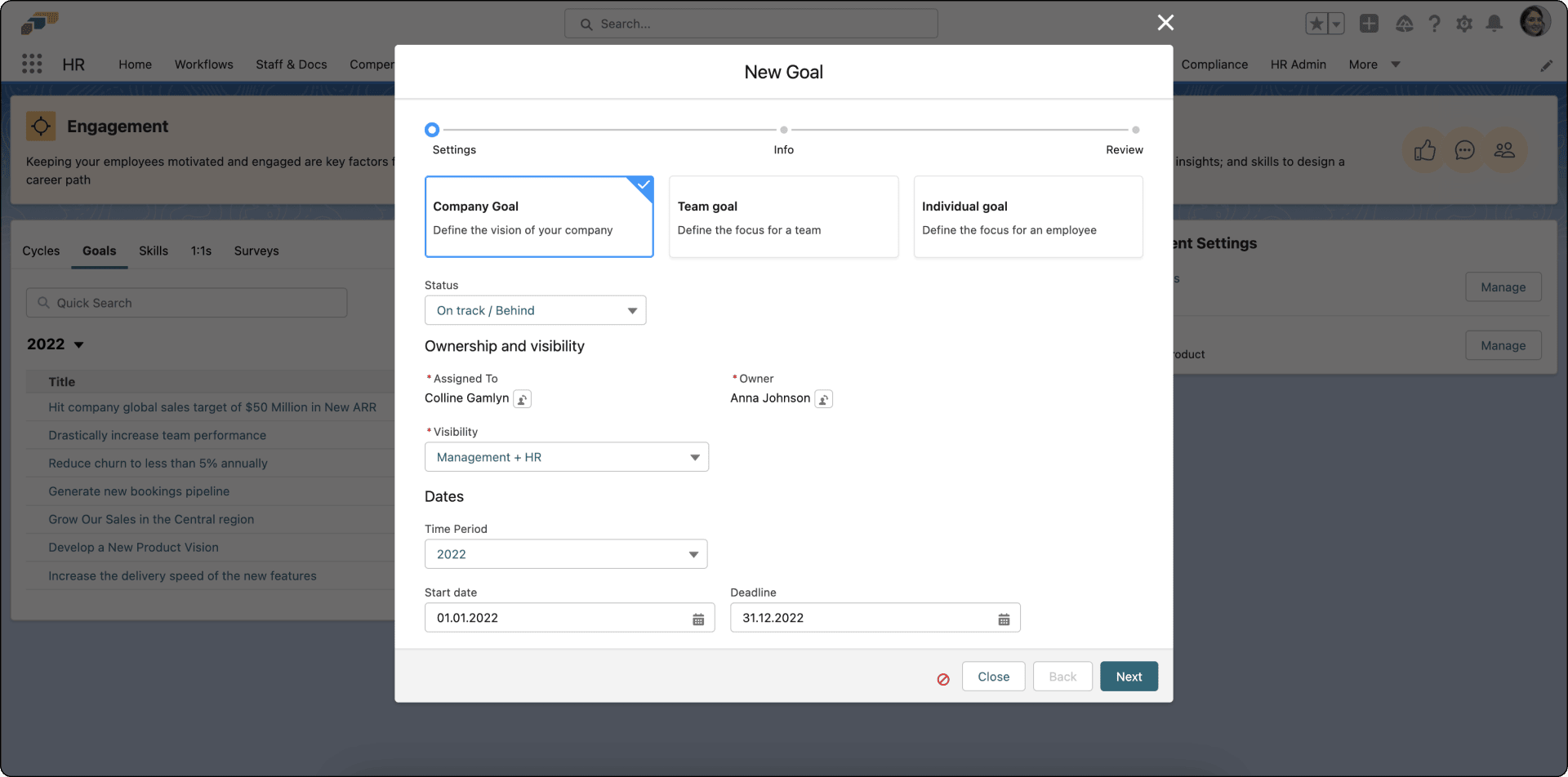
Select the Goal type.
-
Set its status, such as On track.
-
Assign the relevant Employees or Managers.
-
Select a time period. A time period is required.
-
Configure the metrics and visibility.
-
Click Next.
-
Enter a title and description.
-
After you review the values, save the Goal.
Add Key Results
Key Results allow flair to calculate progress and update a Goal's status automatically. Without Key Results, the progress cannot change automatically, and a status such as Behind remains unchanged.
- While the Goal is in Draft, add each measurable Key Result.
- Configure the target for each Key Result.
- Publish the Goal. flair calculates progress as Key Result values change.
After a Goal leaves Draft, you cannot change its configuration. If a published Goal has no Key Results, create a new Goal with the required Key Results.
Create and update Goals in the Employee Hub
Employees work with their Goals under Development → Goals in the Employee Hub. The My goals, My colleagues, and All goals tabs switch between your own Goals, your colleagues' Goals, and every Goal you can see. In manager mode, the same page shows the My reports goals and All goals tabs. For the Goal list, the Goal sidebar, pulling and pushing Goals, and the Goal hierarchy, see Use Goals in the Employee Hub.
If Goals does not appear under Development, an admin has hidden Goals for you in Employee Hub Features.
Create a Goal
- In the Employee Hub, open Development → Goals.
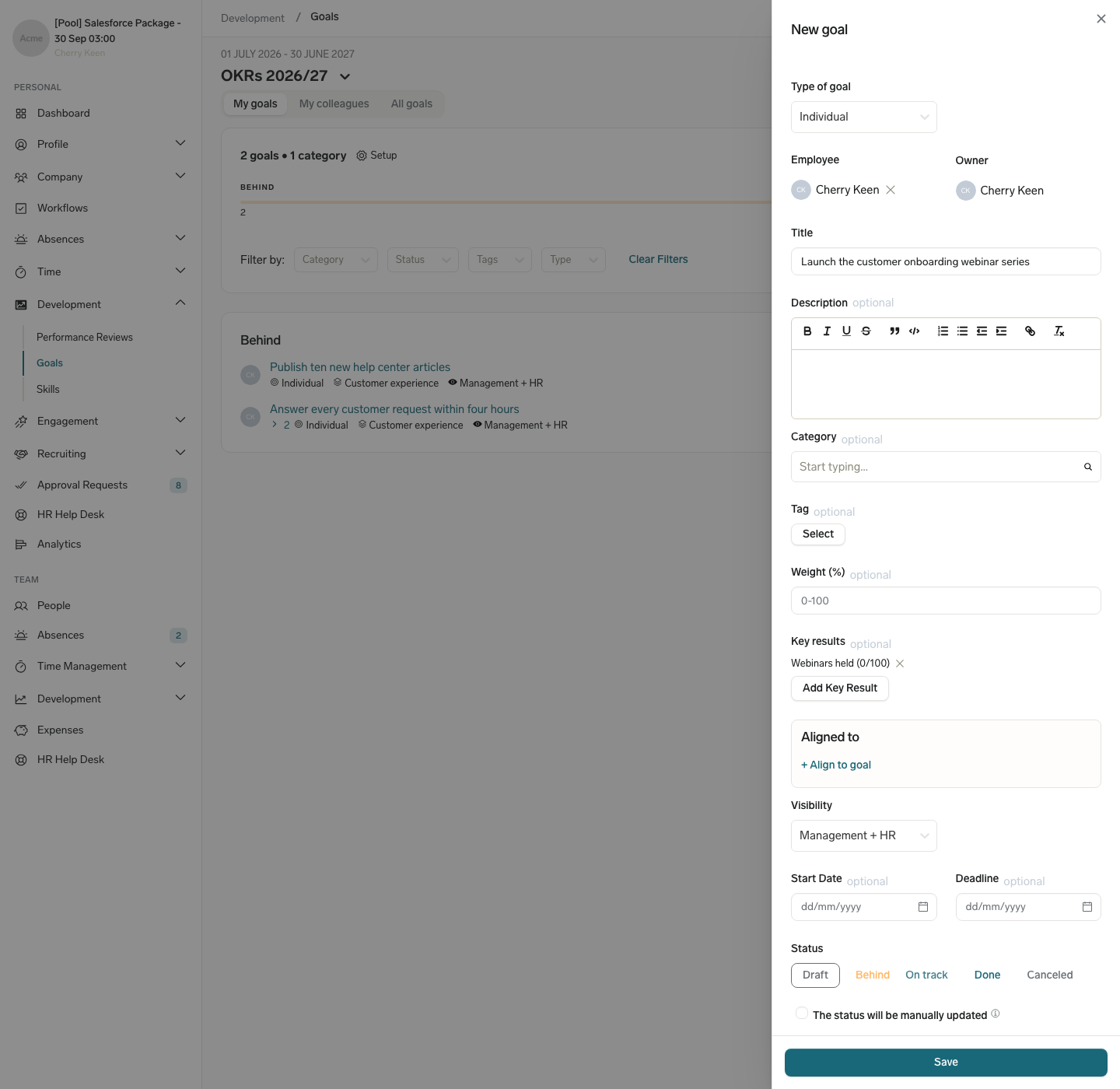
- Click Create Goal. The New goal sidebar opens.
- If you are a manager, select Individual or Team in Type of goal, then select the Employee or Team the Goal belongs to. Employees always create an Individual Goal.
- Enter a Title and, optionally, a Description.
- Optional: Select one or more tags in Tag. Only tags an admin allows for Goals appear. See Choose which tags appear on Goals.
- Optional: To measure progress, click Add Key Result, enter a Title, select a Metric (Percentage, Numeric, or Yes/No), set the Start and Target values, and click Save. Repeat for each Key Result.
- In Visibility, select who can see the Goal. New Goals start with Management + HR. If you select Protected..., select the employees who can see the Goal in Share also with....
- Optional: Set a Start Date and a Deadline. If your company does not use a Development Framework, also select a Time period.
- Under Status, keep Draft or select another status. To set the status yourself instead of letting flair calculate it from Key Results, select The status will be manually updated. You can only choose this when you create the Goal.
- Click Save. The Goal appears in your Goal list.
If your company uses a Development Framework, the sidebar also shows Category and, depending on the configuration, Achievement Scale and Weight (%). In MBO mode, the Key results and Status fields are hidden. The current objective phase can block Goal creation for employees, which disables Create Goal, or send new Goals for approval. See Configure approvals for Goal changes.
Update a Goal's progress and status
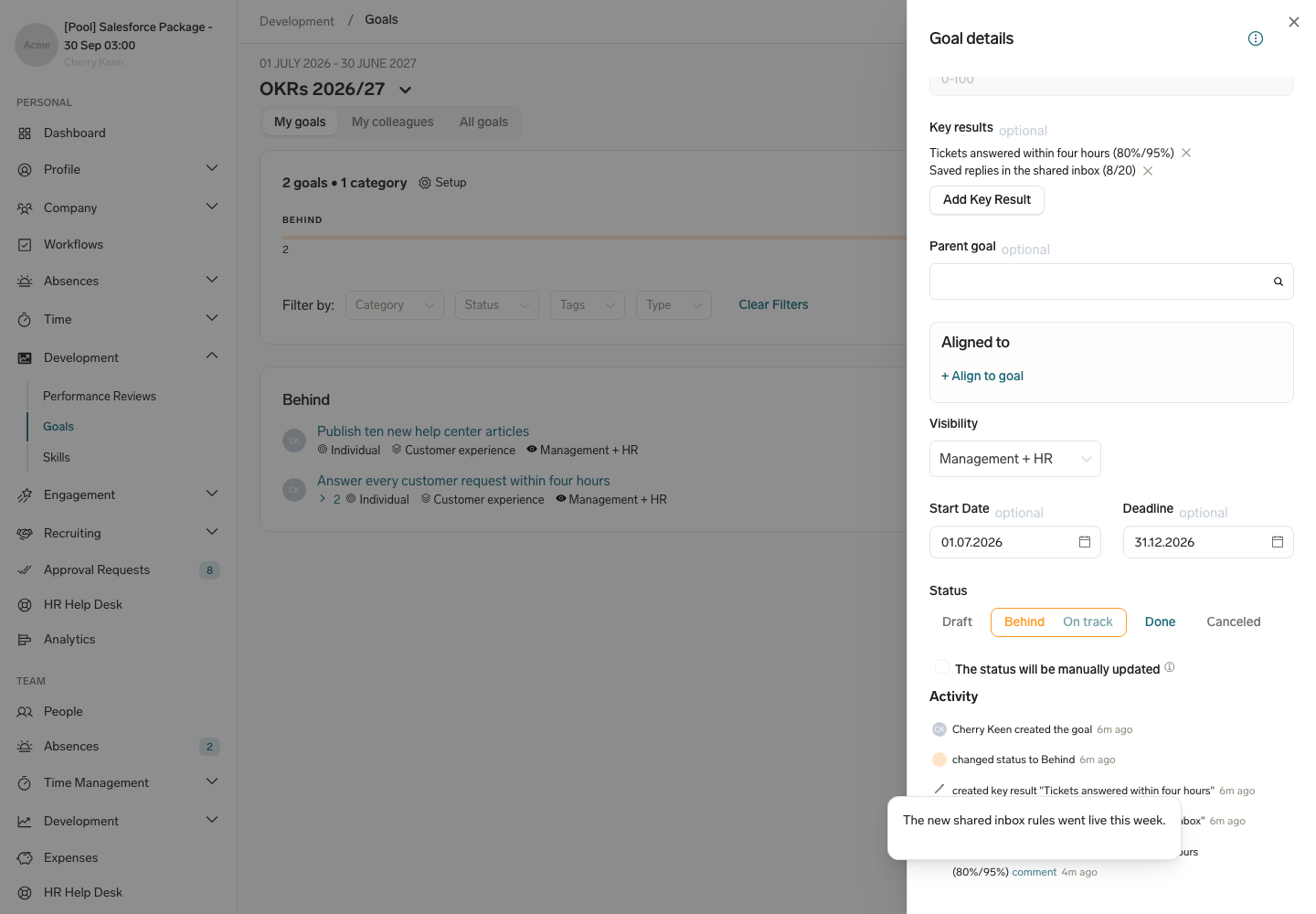
By default, flair sets a Goal to Behind or On track from its Key Result values.
To update a Key Result:
- On the Goals page, expand the Key Results on the Goal's card.
- Click the Key Result.
- Enter the new Value and, optionally, a Comment.
- Click Save. flair recalculates the Goal's progress.
To close or cancel a Goal:
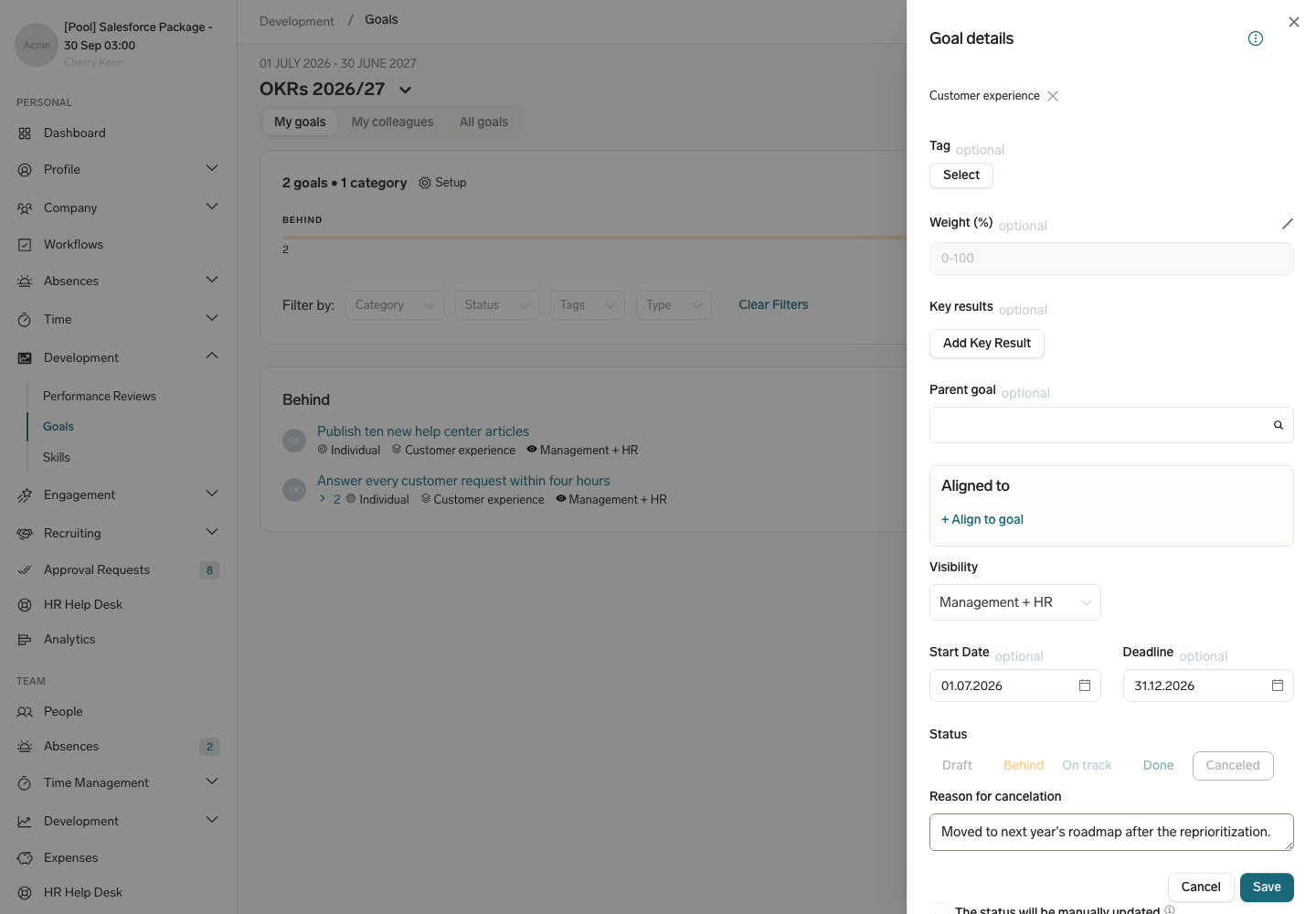
- On the Goals page, click the Goal's title. The Goal details sidebar opens.
- Under Status, select Done or Canceled.
- If you selected Done and the Rate field appears, select a Rate: Exceeded, Fulfilled, or Not Fulfilled. The Rate field appears only in OKR mode, for the Goal's owner and for direct managers. For anyone else, selecting Done saves the status immediately.
- If you selected Canceled, enter a Reason for cancelation. The reason is required.
- Click Save.
Clone a Goal
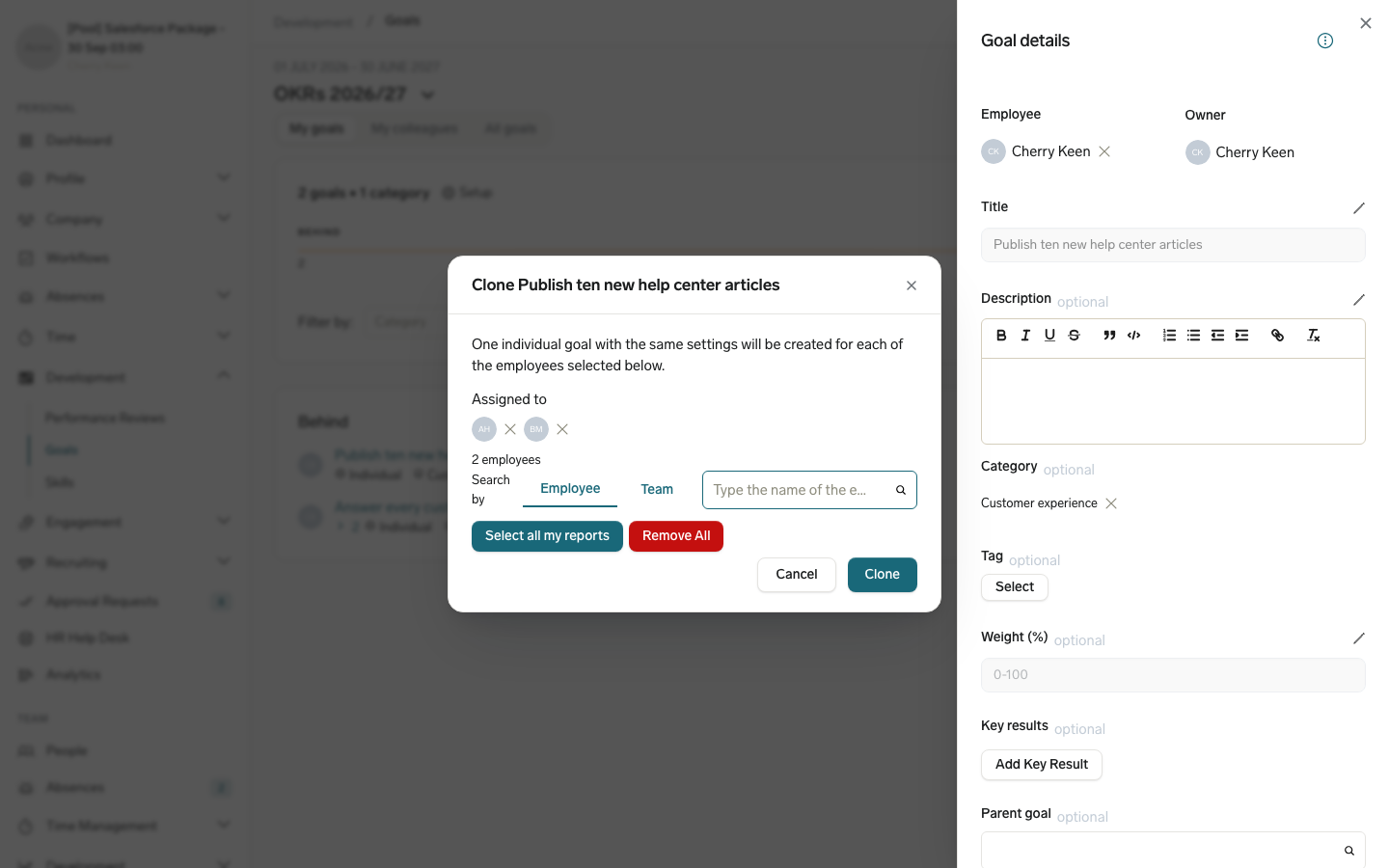
Cloning creates one independent Individual Goal with the same settings for each selected employee. The Clone action appears on Individual Goals you own and, for direct managers, on Individual Goals they can open. You can clone a Goal only for yourself or your direct reports. To create copies that stay linked to the original Goal, push the Goal instead.
- On the Goals page, click the Goal's title to open the Goal details sidebar.
- Open the actions menu and click Clone.
- Add employees by Employee or by Team. Managers can also click Select all my reports.
- Click Clone. flair creates a Goal for each selected employee.
Review a Goal's activity
The Activity section at the bottom of the Goal details sidebar lists every change to the Goal, such as status changes, Key Result updates, added tags, and sharing changes. When someone entered a comment with a Key Result update, hover over comment next to the entry to read it.