HR-Digest-Benachrichtigungen konfigurieren
Senden Sie HR-Teams eine automatische E-Mail-Zusammenfassung bevorstehender Mitarbeitergeburtstage, Arbeitsjubiläen und Abwesenheiten. Konfigurieren Sie jeden Digest auf HR Home oder in HR Admin mit Empfängern, Zeitplan, Inhalt und Mitarbeitersegment.
Salesforce-Benutzer mit der benutzerdefinierten Berechtigung HR_Manager. HR Home zeigt die Karte Digest-Konfigurationen nur diesen Benutzern an.
Einen HR-Digest erstellen
- Öffnen Sie in Salesforce HR Home. Sie können auch HR Admin → Benachrichtigungen → Digests öffnen, wo dieselben Digests aufgelistet sind.
- Klicken Sie auf Neue Konfiguration hinzufügen. Auf HR Home ist das das +-Symbol auf der Karte Digest-Konfigurationen.
- Wählen Sie unter Digest-Typ die Option HR aus.
- Wählen Sie unter Team das Empfängerteam aus, beispielsweise
HR Germany. - Wählen Sie unter Häufigkeit die Option Täglich, Wöchentlich oder Monatlich aus.
- Konfigurieren Sie den Zeitplan für die ausgewählte Häufigkeit.
- Wählen Sie die Inhalte aus: Geburtstage einbeziehen, Jubiläen einbeziehen, Abwesenheiten einbeziehen oder eine beliebige Kombination. Geburtstage und Jubiläen sind standardmäßig ausgewählt, Abwesenheiten nicht.
- Aktivieren Sie Aktiv.
- Klicken Sie auf Speichern. flair plant die nächste Ausführung ausgehend von der ausgewählten Sendezeit.
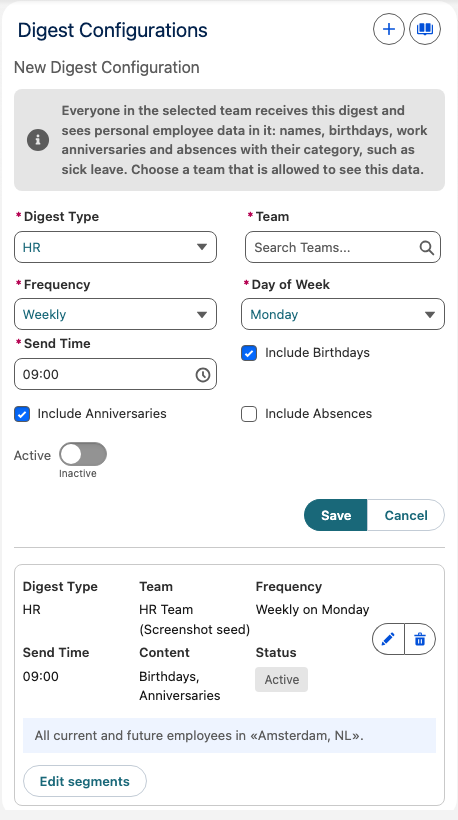
Alle Mitglieder des ausgewählten Teams erhalten den Digest und sehen darin personenbezogene Daten von Mitarbeitern: Namen, Geburtstage, Dienstjubiläen und, mit Abwesenheiten einbeziehen, Abwesenheiten mit ihrer Kategorie, etwa Krankheit. Wählen Sie ein Team, das diese Daten sehen darf.
Die Häufigkeit steuert folgende Zeitplaneinstellungen und E-Mail-Zeiträume:
| Häufigkeit | Zeitplan | Ereignisse in der E-Mail |
|---|---|---|
| Täglich | Wählen Sie eine Sendezeit aus. | Ereignisse heute und morgen. |
| Wöchentlich | Wählen Sie einen Wochentag und eine Sendezeit aus. | Ereignisse von heute bis zu den nächsten 7 Tagen. |
| Monatlich | Wählen Sie einen Tag zwischen 1 und 28 sowie eine Sendezeit aus. | Ereignisse von heute bis zu den nächsten 30 Tagen. |
Einen Digest mit einem Mitarbeitersegment begrenzen
Verwenden Sie ein Mitarbeitersegment, um einen Digest anhand von Kriterien wie Standort oder Entity zu begrenzen.
- Suchen Sie auf der Karte Digest-Konfigurationen den gespeicherten Digest.
- Klicken Sie auf Segmente bearbeiten.
- Definieren Sie die Kriterien, beispielsweise
Location = AmsterdamoderEntity = Germany GmbH. - Klicken Sie auf Speichern.
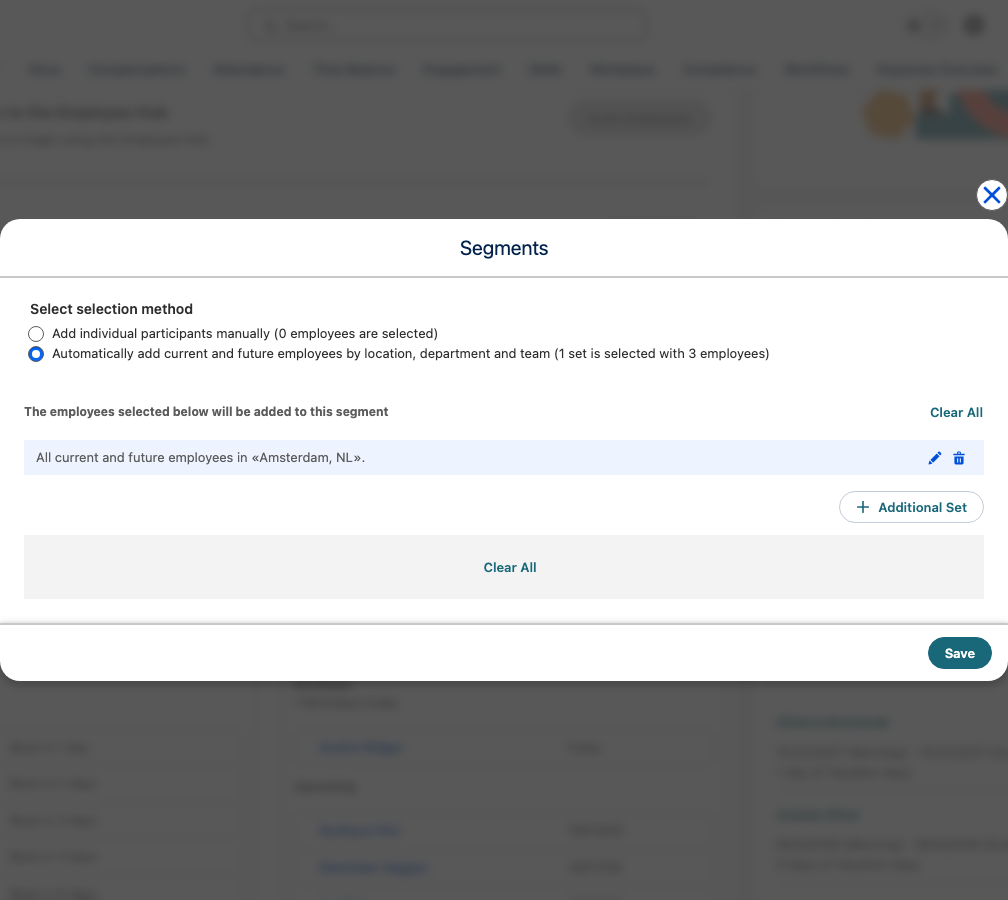
Sie können mehrere Konfigurationen mit unterschiedlichen Segmenten erstellen:
| Digest | Team | Segment | Häufigkeit |
|---|---|---|---|
| Germany HR Digest | HR Germany | Standort: Deutschland | Wöchentlich am Montag |
| Austria HR Digest | HR Austria | Standort: Österreich | Wöchentlich am Montag |
| All Company Digest | People Team | Alle Mitarbeiter | Monatlich am ersten Tag |
Digest-E-Mail prüfen
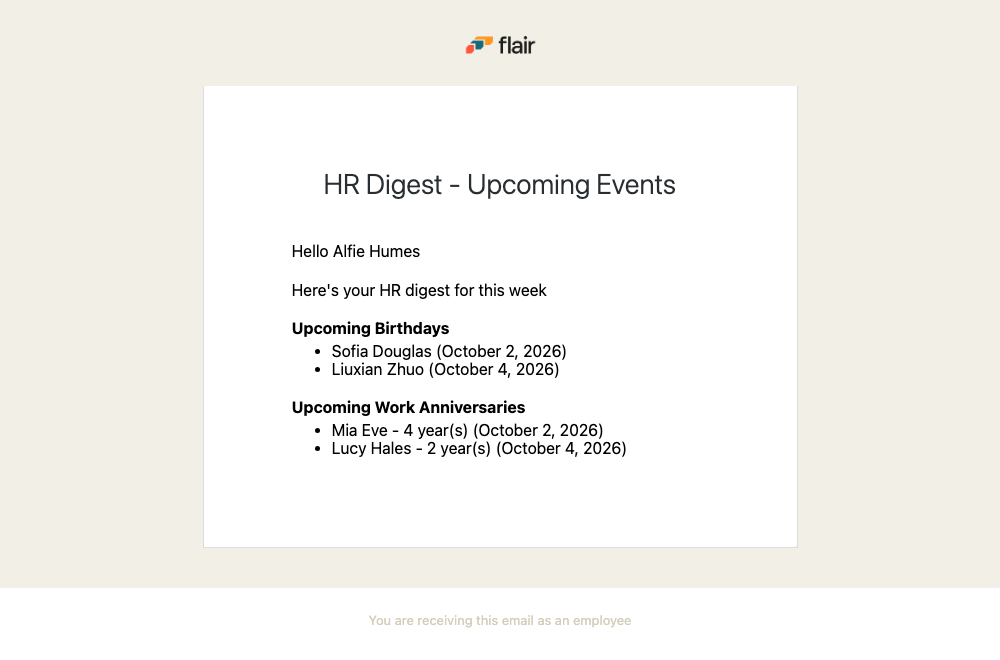
Die E-Mail mit dem Betreff HR Digest - Upcoming Events listet Mitarbeiter mit Geburtstagen und Arbeitsjubiläen im durch die Häufigkeit bestimmten Zeitraum auf. Mit Abwesenheiten einbeziehen listet sie zusätzlich die genehmigten Abwesenheiten der erfassten Mitarbeiter, die in diesen Zeitraum fallen, mit Mitarbeiter, Abwesenheitskategorie und Datum.
HR-Digests verwalten
Auf HR Home können Sie alle gespeicherten Digests verwalten:
- Bearbeiten ändert Digest-Typ, Team, Häufigkeit, Zeitplan oder enthaltene Inhalte.
- Wenn Sie Aktiv unter Bearbeiten ausschalten, wird ein Digest pausiert, ohne seine Konfiguration zu entfernen. Schalten Sie die Option wieder ein, um ihn fortzusetzen.
- Segmente bearbeiten ändert, welche Mitarbeiter der Digest abdeckt.
- Löschen entfernt die Digest-Konfiguration.